
Sound of Text Melayu: The Perfect Voice for Your WhatsApp
Are you tired of the standard, repetitive “ding” or “beep” when you receive a message on WhatsApp? What if your phone could literally announce your notifications in fluent Malay? With Sound of Text Melayu, you can turn any custom text into a natural-sounding Malay audio clip and set it as your unique WhatsApp ringtone or notification sound.
This guide will show you exactly how to generate these custom MP3 files and apply them to your messaging app.
Why choose a “Melayu” voice?
Creating a voice notification in Malay allows you to bring a touch of local flavor and personality to your phone. The text-to-speech technology interprets the specific nuances and pronunciation of the Malay language, allowing for natural, distinct, and sometimes humorous announcements.
Because Indonesian and Malay share a similar linguistic root, you can effectively use the Indonesian voice profile available on most TTS engines, including Google Translate’s engine, to achieve a flawless Malay or “Melayu” sound.
Step 1: Generate your Malay audio file
Creating your custom audio file only takes a few seconds. Follow these steps:
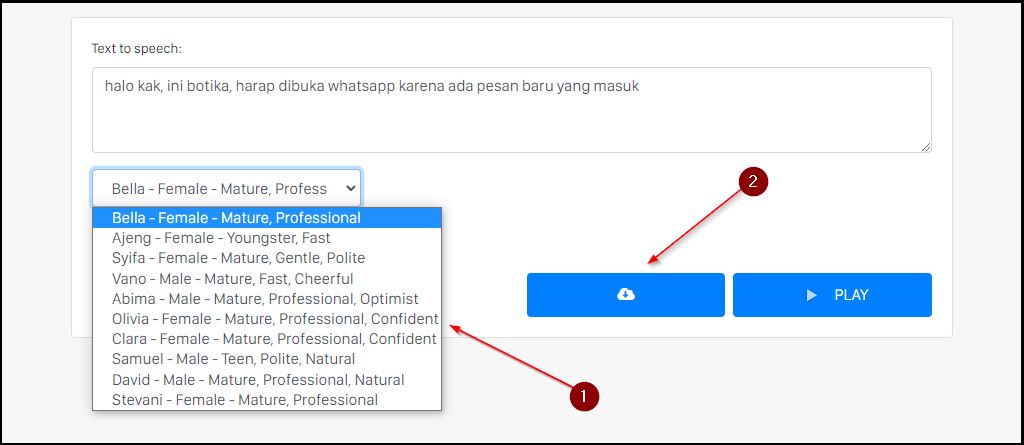
- Open the tool: Go to the Sound of Text homepage.
- Type your message: In the text box, type your custom Malay phrase. Keep it short and catchy! (e.g., “Ada mesej baru untuk awak!” or “Bos, angkat telefon cepat!”).
- Select the voice: Open the language dropdown menu and select Indonesian (which perfectly handles Malay pronunciation).
- Convert & Download: Click the Convert to Speech button to listen. Once generated, click the Download button to save the file as an MP3 directly to your device.
Step 2: Set the audio as your WhatsApp ringtone
Once you have downloaded your customized Malay MP3 file, you need to set it up on your phone.
For Android users:
Method 1: Using the File Manager
- Open your phone’s File Manager app.
- Go to Internal Storage and find the Downloads folder.
- Locate your new MP3 file and Move or Copy it to the folder named Notifications. (If you don’t have a Notifications folder, simply create one).
Method 2: Through WhatsApp Settings
- Open WhatsApp and tap the three dots to go to Settings.
- Tap on Notifications.
- Under “Messages” or “Groups”, tap on Notification tone.
- You should now see your newly downloaded MP3 file in the list. Tap it to select it!
(Note: If the file doesn’t appear in WhatsApp, try opening your default Clock/Alarm app, adding the MP3 as an alarm sound, and then checking WhatsApp again. This forces Android to scan the file!)
Ideas for your custom Melayu ringtone
Not sure what to make your phone say? Try some of these short, punchy phrases:
- “Ada mesej masuk ni!”
- “Tolong baca mesej sekarang.”
- “Sila cek WhatsApp, bos!”
- “Awak ada notification baru.”
You don’t need any complex software or technical skills to make your phone sound truly unique. Try the Sound of Text tool today and give your WhatsApp notifications a personalized Melayu touch!